

Search verification and IndexNow
SEO Tools adds verification tags to client-area pages and submits sitemap addresses through IndexNow. If it is off, turn on SEO Tools in Extensions → Overview first.
Set up verification and IndexNow
Section titled “Set up verification and IndexNow”- Go to Extensions → Overview and select Settings next to SEO Tools.
- Paste the verification codes into the fields below. Use only the meta tag’s
contentvalue, without the surrounding tag. Leave a field empty to clear its code. - Select Save. This also creates the IndexNow key if it is missing.
- Open the Key link. ClientFence serves
/<key>.txtautomatically, containing the key so search engines can verify it belongs to your site. - Select Submit now to send the Sitemap addresses to IndexNow. Check Last submit for Accepted or Failed and the result details.
| Field | Tag added to client-area pages |
|---|---|
| Google Search Console | google-site-verification |
| Bing Webmaster Tools | msvalidate.01 |
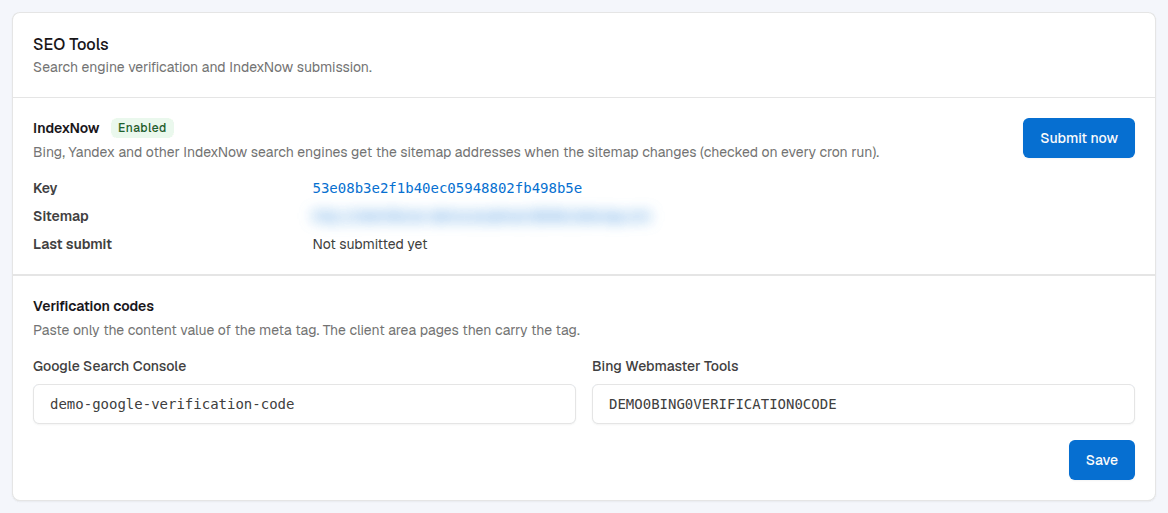
Each cron run checks the sitemap and submits its addresses to IndexNow when it changes. After a failed submission, automatic retries wait a day. Submit now submits even if the sitemap has not changed.