

Server access and secrets on tickets
Clients often need to give support a server login. Ticket secrets keep it out of the message: the client adds it in its own form, it is stored encrypted, and only staff with the right permission can open it. Every opening is shown to the client, and the secrets are deleted when the ticket closes.
Turn it on
Section titled “Turn it on”Go to System → Settings → Support and find Ticket Secrets.
| Setting | What it does |
|---|---|
| Let clients add server access details | Clients can add a host, port, username and a password or SSH private key. |
| Let clients add other secrets | Clients can add any other secret with a short label, such as a WordPress admin login. |
| Delete secrets after | Secrets older than this many days (1 to 90, default 7) are deleted even if the ticket is still open. |
Both kinds are off by default. Turn on one or both, then select Update.
What the client sees
Section titled “What the client sees”- New ticket: a folded Server access (optional) section under the message. The secret is added as soon as the ticket is created.
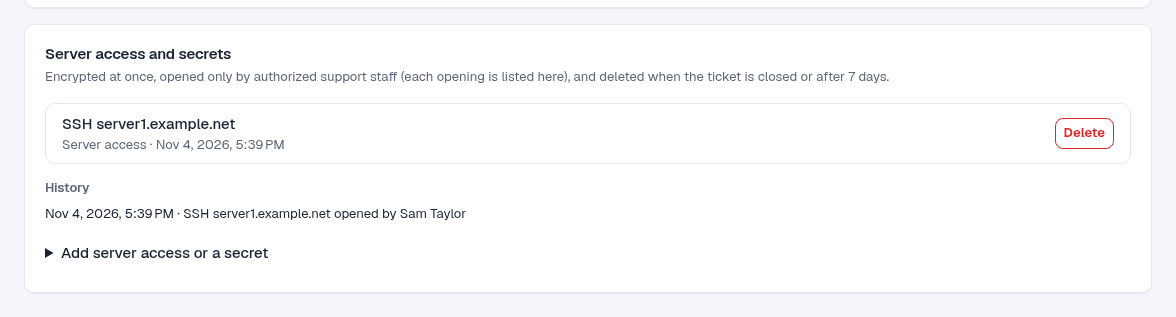
- Ticket page: a Server access and secrets card lists what was added (never the values), a History of who opened or deleted what, and a form to add another one while the ticket is open. Clients can delete their own secrets at any time.
Guest tickets (opened without signing in) cannot hold secrets.
Open a secret as staff
Section titled “Open a secret as staff”On the ticket, the Server access and secrets card sits above the conversation. Select Show to see the values, each with a Copy button. Select Show again to hide them. Each opening is recorded with your name and shown to the client.
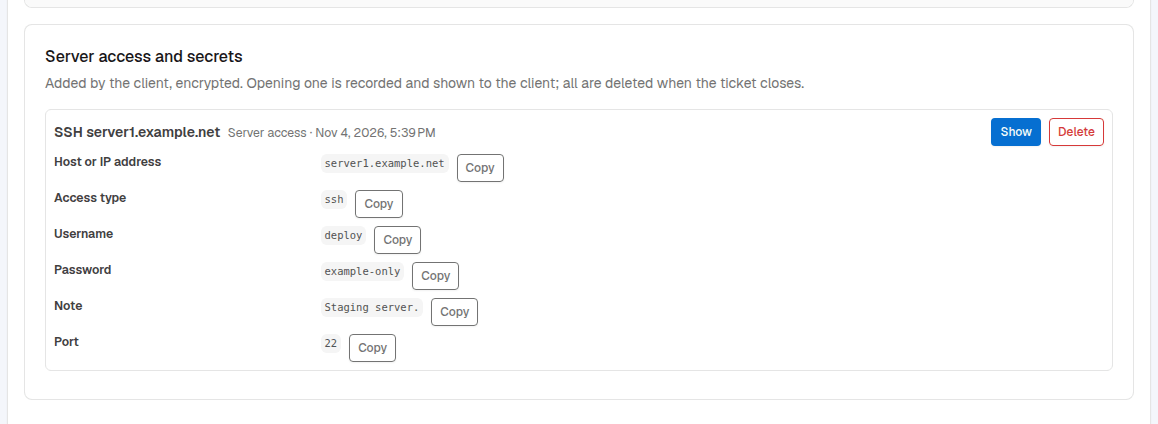
Only staff whose group has the Open ticket secrets permission (under Support in the group’s permissions) see Show. Other staff see that secrets exist, but not their values. Deleting a secret needs Manage tickets.
When secrets are deleted
Section titled “When secrets are deleted”Secrets are deleted when:
- the ticket is closed, by staff, by the client or by auto-close;
- the ticket is merged into another one, or deleted;
- they are older than the Delete secrets after days;
- the client or a staff member deletes them.
The history stays on the ticket, so the client can still see who opened what.
Secrets never appear in ticket messages, emails or logs. Ask clients to change a password after the work is done.